The History of HEX, RGB & HSL
Every color on your screen is, underneath, a handful of numbers. But the three ways designers write those numbers, HEX, RGB and HSL, come from very different places: a Victorian physics demonstration, the memory printouts of 1960s mainframes, and a pair of 1970s research papers about making computers easier for people to talk to. This page traces where each came from, and why all three still sit side by side in the tools you use today.
RGB: mixing light
The idea behind RGB is older than any computer. In the early 1800s, Thomas Young proposed that the human eye sees color through three kinds of receptor, and Hermann von Helmholtz developed the theory later in the century. In 1861, James Clerk Maxwell put it on show: a tartan ribbon was photographed three times through red, green and blue filters (the photographs were taken by Thomas Sutton), and when the three black-and-white images were projected through matching colored light and overlapped, the ribbon appeared in color. It is generally regarded as the first demonstration of color photography.
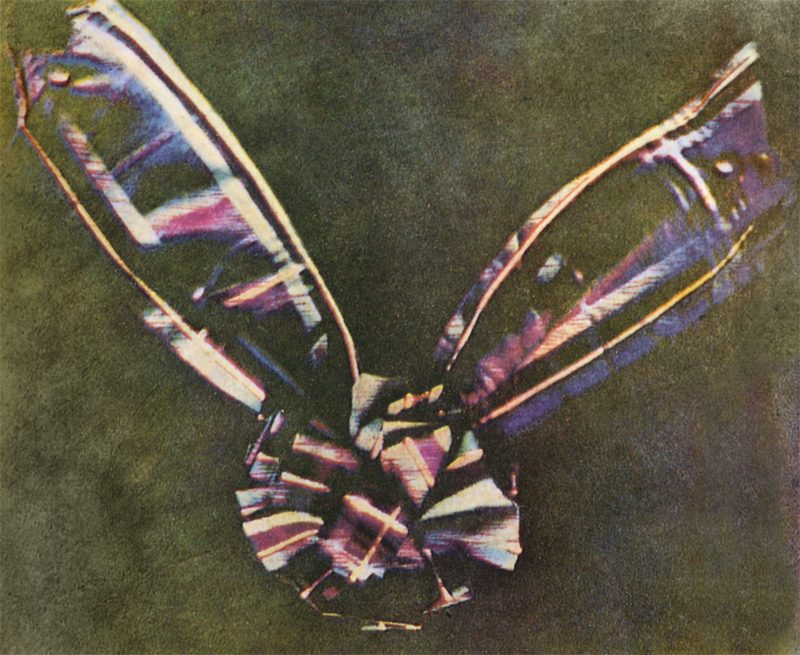
Color television and the cathode-ray tube monitors that followed used the same principle, with red, green and blue phosphors glowing at different strengths. RGB is an additive model: all three at full strength make white, none at all makes black. Computers typically store each channel in eight bits, which gives 256 levels from 0 to 255, and 256 × 256 × 256 comes to about 16.7 million possible colors.
One problem remained: the same numbers could look different on different screens. In 1996, HP and Microsoft proposed a standard color space called sRGB to fix this. It was later published as an international standard (IEC 61966-2-1, in 1999) and is still the default color space of the web.
HEX: RGB in shorthand
Hexadecimal is a base-16 number system, counting 0 to 9 and then A to F. Programmers working on 1960s mainframes, such as IBM’s System/360, routinely read and wrote memory in hexadecimal, because one hex digit stands for exactly four binary digits. It is a compact, readable way to write the long strings of ones and zeros that machines actually use.
That compactness suits color well. One eight-bit channel holds 256 values, which is exactly two hex digits, 00 to FF. Three channels therefore fit into six characters. Take #E2725B, the Terra Cotta shade featured on the Chromonyms homepage: E2 is 226 for red, 72 is 114 for green, and 5B is 91 for blue, so it is the same color as rgb(226, 114, 91), just written more briefly.
= rgb(226, 114, 91)
= Terra Cotta
Early web browsers of the mid-1990s accepted hex color values in HTML attributes, and the CSS1 specification of 1996 made the #rrggbb notation, along with the three-digit shorthand such as #fff, a standard part of web styling. Around the same time, when many computers could display only 256 colors at once, designers stuck to a “web-safe” palette of 216 colors, built from six values per channel (00, 33, 66, 99, CC and FF).
Names came along too. HTML 3.2 (1997) defined sixteen named colors, and CSS later adopted a much longer list of 147 names, many of them taken from an older X11 color list. One of the most recent additions is rebeccapurple (#663399), added in 2014 in memory of Rebecca Meyer, the young daughter of web standards pioneer Eric Meyer.
HSL: color for humans
HEX and RGB describe how a screen mixes light. They say little about how people think about color. If someone asks for a color that is “a bit lighter,” nobody knows which hex digits to change. Long before computers, Albert Munsell had tackled the same problem for painters and printers, publishing in 1905 a system that described every color by its hue, value (lightness) and chroma.
In 1978, two groups of computer graphics researchers published closely related ideas. George Joblove and Donald Greenberg at Cornell University, and Alvy Ray Smith (later a co-founder of Pixar) at the New York Institute of Technology, each described ways of rearranging RGB into more intuitive dimensions. The results became known as HSL (hue, saturation, lightness) and HSV (hue, saturation, value).
In HSL, hue is an angle around a 360° color wheel, with red at 0°, green at 120° and blue at 240°. Saturation runs from gray to full intensity, and lightness runs from black through the pure color to white. HSL is not a different set of colors, only a different way of describing the same ones, so any HSL value converts to RGB and HEX and back again. CSS added the hsl() notation in its Color Module Level 3, which became a W3C Recommendation in 2011.
HSL has a known weakness: it is not perceptually uniform, so two colors with the same lightness value can look noticeably different in brightness (a pure yellow looks far lighter than a pure blue, for example). Newer color models such as Lab and OKLCH were designed to address this, and are now appearing in CSS as well.
A short timeline
- 1861 Maxwell demonstrates color photography using red, green and blue filters.
- 1905 Munsell publishes his hue, value and chroma system.
- 1978 HSL and HSV are described in computer graphics research.
- 1996 CSS1 standardizes hex colors for the web, and sRGB is proposed.
- 1997 HTML 3.2 defines sixteen named colors.
- 2011 CSS Color Module Level 3 becomes a W3C Recommendation.
- 2014 rebeccapurple is added to CSS.
Why all three still exist
Each format has survived because it is good at something different. HEX is short and easy to copy into code and brand guides. RGB is the natural format for image editors and anything that adjusts individual channels. HSL is the easiest to reason about when you want a lighter shade, a more muted tone or a matching palette. Print adds a fourth model, CMYK, which works by subtracting light with ink rather than adding it with a screen, and which Chromonyms also shows for every color.
Because the formats are interchangeable, the real task is moving between them and putting a name to the result, which is what Chromonyms does. You can try it on the homepage with any HEX, RGB or HSL value.
← Back to Chromonyms